
Reflow Oven Traceability
Smarter. Faster. Fully Traceable.
Know exactly what happened to every board — and prove it.
Every board that passes through a BTU reflow oven leaves a complete, time-stamped record — triggered by barcode, tied to the recipe, and ready for your MES.


What traceability actually means
In high-stakes manufacturing — particularly automotive and aerospace electronics — process compliance isn't just about running the oven correctly. It's about documenting it, board by board, with records that can withstand an audit or a field investigation years later.
BTU's Wincon™ control system makes that level of documentation standard. Through integrated equipment logging, barcode-triggered product records, and Profile Guardian process monitoring, every board that passes through a BTU reflow oven can leave a complete, time-stamped trail.
Measuring Temperature — At Board Level, Not Just Zone Level
Standard oven control thermocouples measure air temperature within each heating zone. That's the foundation of process control — but it isn't traceability. What traceability requires is a record of what each board actually experienced as it traveled through the oven.
Profile Guardian is a redundant monitoring system that addresses this precisely. Running continuously — 24 hours a day, 365 days a year — it provides early notification of issues with the oven's thermal profile, including aging control thermocouples, incorrect recipe settings, or heater and blower failures that the primary control system might not catch.
How the product log captures zone-by-zone temperature data
The Wincon product log records data from each zone at the moment the middle of the board passes through the middle of that zone. This means the log captures a precise snapshot of oven conditions at the exact point of product contact — not an average, not a background reading.
For each board processed, the product log records:
- Board barcode / product ID (required to trigger the log)
- Production start time and end time with UTC offset (YYYYMMDDHHMMSSCC format)
- Recipe name, revision number, and last-executed timestamp
- Operator ID
- Zone quantity — total heating and cooling zones
- Temperatures — setpoints and actuals for each zone (top side)
- Pressure — setpoints and actuals
- Conveyor speed — setpoints and actuals
- O2 levels — if gas sampling is installed
- Profile Guardian data — actuals and baseline for each zone
- Pass / Fail result
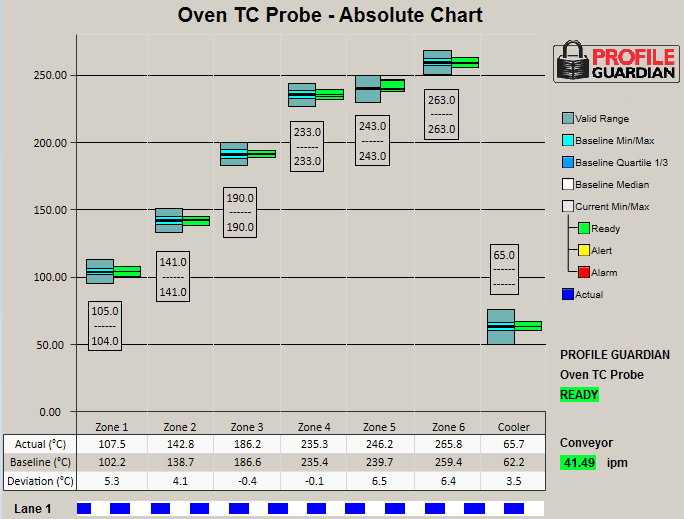
Establishing the Baseline — What Normal Looks Like
Profile Guardian's value as a traceability tool begins before any boards are processed. For each recipe, Profile Guardian requires a baseline to be established: a collection of data that defines what normal operation looks like for that specific product on that specific oven.
A baseline isn't a single temperature target. It captures five statistical measures across the collected data: the Minimum, Maximum, Quartile 1, Quartile 3, and Median readings for each zone probe. This gives a statistically grounded picture of what to expect — and makes deviations meaningful rather than arbitrary.
What the charts show operators
- Baseline profile — the median and quartile bands established during normal operation
- Actuals — live readings from the Profile Guardian probe for each zone
- Recipe setpoints — what the oven is programmed to do
- Deviation view — how far actuals have strayed from the baseline, with configurable alert and alarm thresholds
- Current status — pass, alert, or alarm, visible at a glance
Because Profile Guardian is fully integrated with Wincon™, it is aware of all oven state changes — recipe changeovers, energy savings modes, ready state transitions. This means it can distinguish between a true process deviation and a normal operational transition, eliminating false alarms while ensuring real issues are flagged.
Security privileges also allow operators to be prevented from running a recipe without a valid baseline, which adds a layer of process control beyond monitoring.
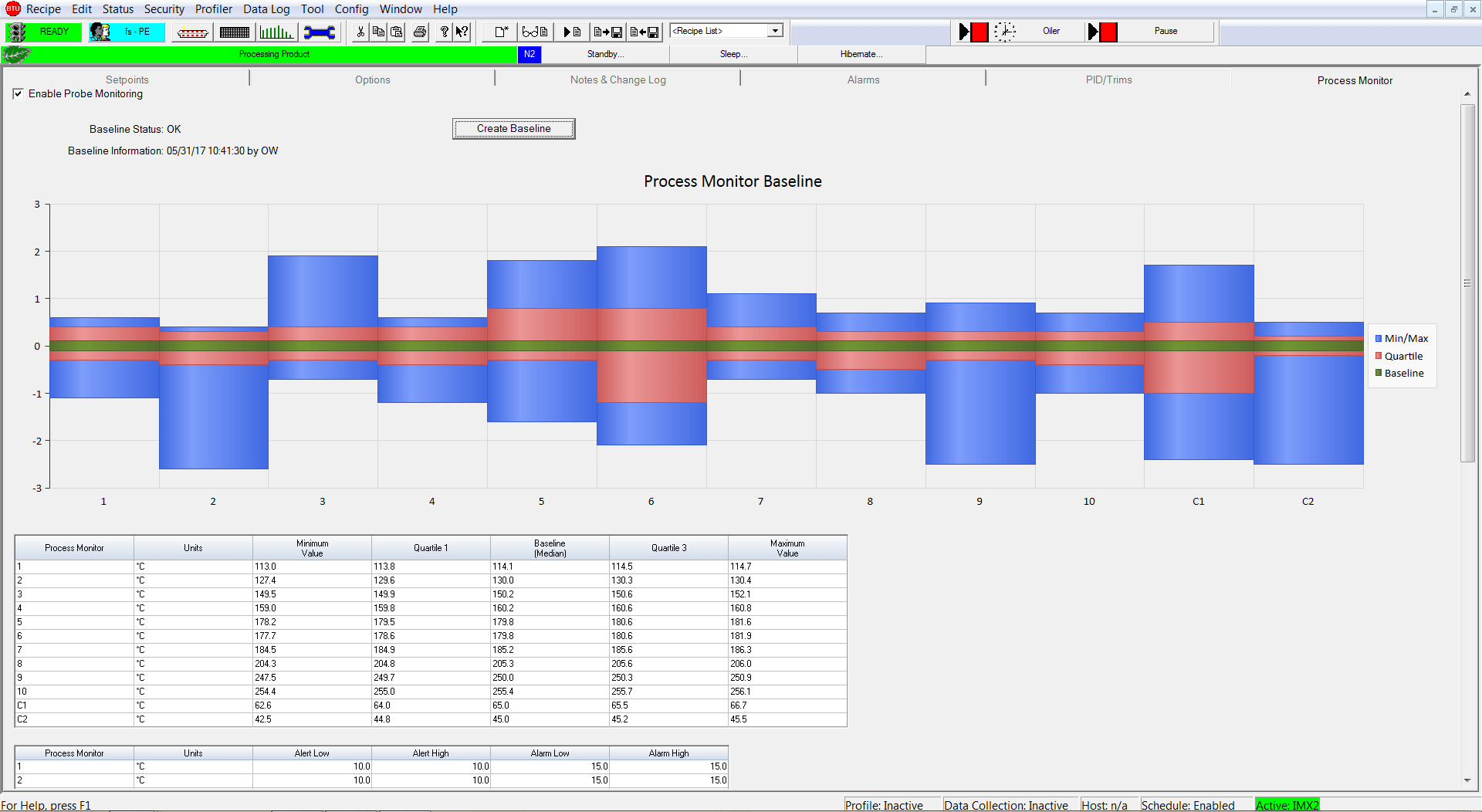
Establishes process baseline
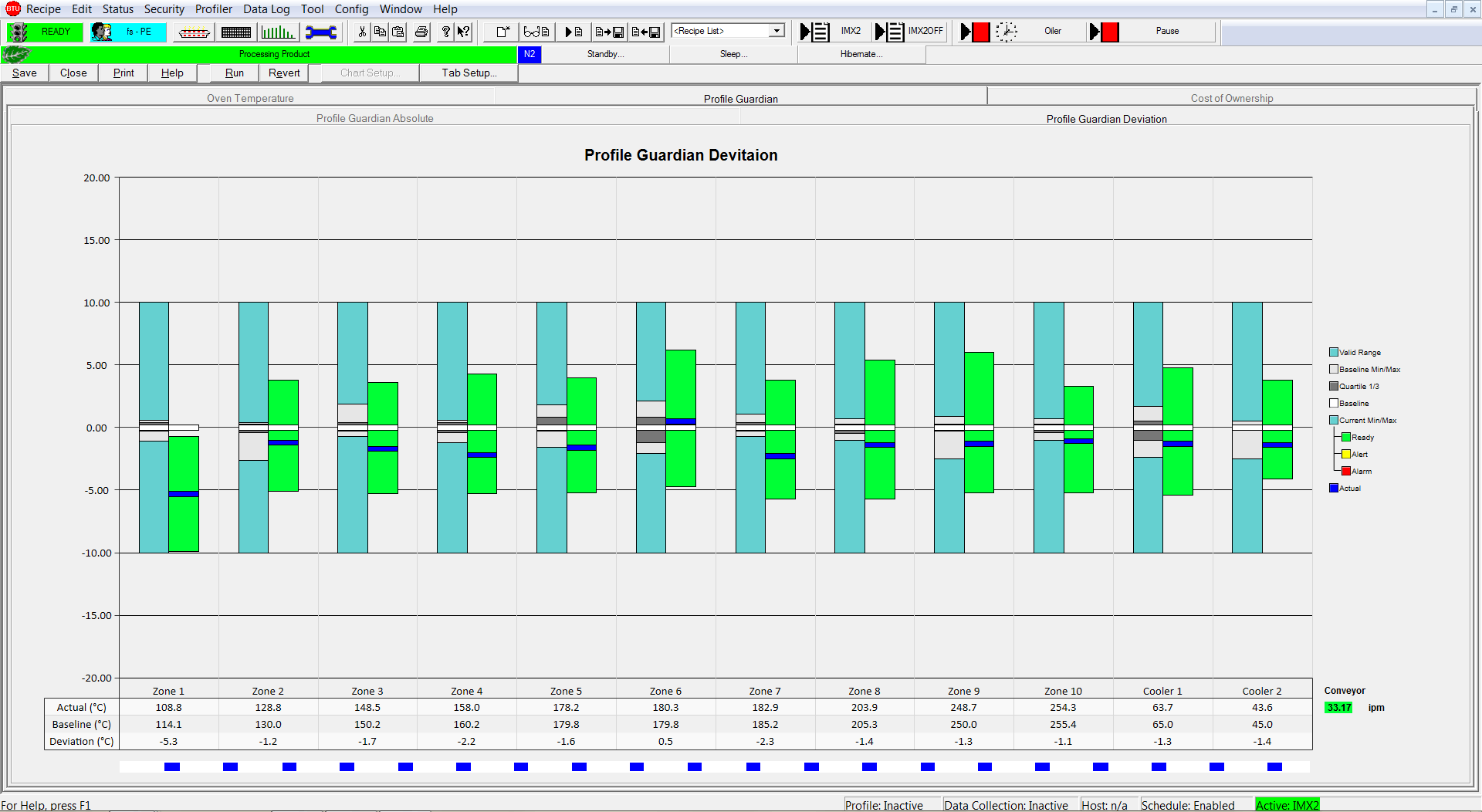
Absolute deviation view with allowable ranges
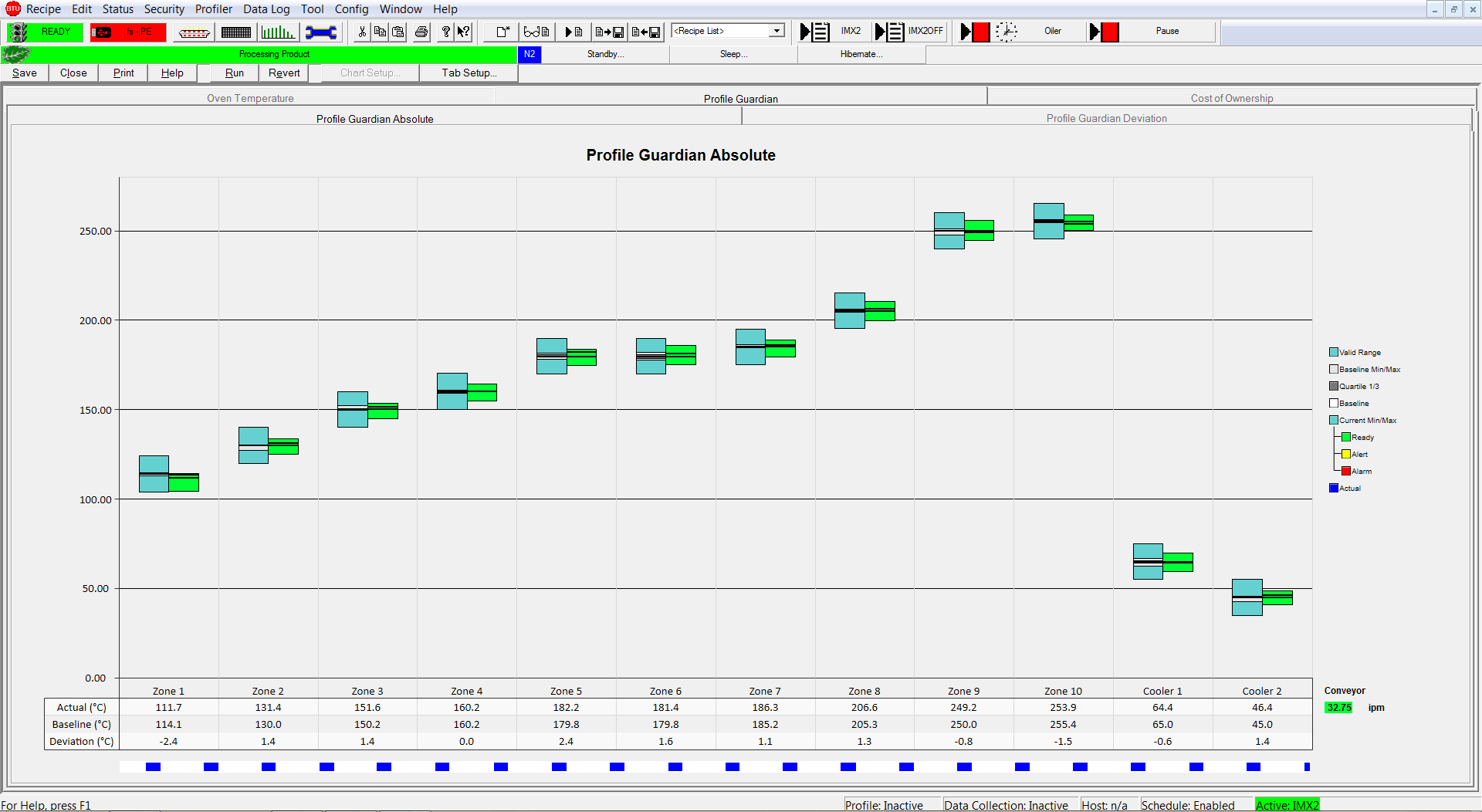
Profile view of process with actual and alert/alarm bands
Alerting on Deviations — Before Problems Become Escapes
Profile Guardian continuously compares live zone readings against the stored baseline. When readings drift outside the acceptable range, alerts and alarms fire — before the product escapes the line.
The pass/fail determination is meaningful because it is configurable. The Process Result Options dialog lets you choose which process conditions affect the result. For example, you can decide that a Low Air pressure alert or a Cooler Temperature alarm does not affect the process result — meaning those conditions can exist while the oven is running without triggering a FAIL on the board record. This avoids false failures while ensuring the conditions you care about are enforced.
What goes into a FAIL record
When a process result is a FAIL, the product log includes the error detail — the specific alarm category and error message that caused the failure. Possible alarm categories that can affect the result include:
- Discrete (External Alarms)
- Temperature
- Heater Monitors
- Pressure
- Conveyor Motion
- O2 Monitor
- Profile Guardian
- Rail Width
The alarm log also shows the full event timeline around a FAIL — when the process state changed, when alarms fired and cleared, and the barcode scan entry that identifies the board. This gives you both the result and the context to investigate it.
Why this matters for automotive suppliers
When a field issue surfaces, automotive OEMs may ask: which boards were in the oven during the process excursion?
With Profile Guardian and barcode-linked product logs, that question has a precise answer — not 'all boards from that shift,' but the exact board IDs with timestamps showing they were in the oven during the deviation window. This can mean the difference between a contained corrective action and a full lot recall.
Connected Factory — Getting Traceability Data Off the Oven
A product log on a local drive is a starting point. Real traceability means that data flows automatically into the systems that manage your production — your MES, quality database, or factory analytics platform.
Barcode integration: how a board gets its record
The barcode scanner is what connects a physical board to its data record. Wincon supports both handheld and fixed-position barcode scanners. Typical compatible models include SICK and DATALOGIC scanners supporting 1D and 2D formats (Code 39, Code 93, Code 128, Data Matrix).
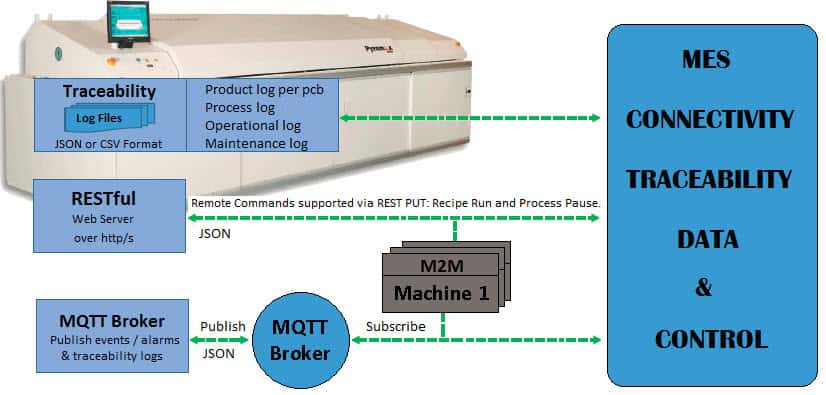
When a barcode is scanned at the oven entrance, Wincon triggers the product log for that board. The log filename is built from two pieces: the timestamp (YYYYMMDDHHMMSSCC) and the product ID from the barcode scan. This means every log file is uniquely identified and immediately traceable to a specific board at a specific time — no manual correlation required.
For fixed-position scanners, a photo sensor triggers the laser automatically as product enters the oven. The scanner communicates with Wincon via RS232 serial port.
Four log types — a complete traceability ecosystem
Wincon's equipment logging goes beyond the per-board product log. Four distinct log types together capture a full picture of production:
| Capability | What it means |
|---|---|
| Product Log | One log per board processed. Captures temperature, pressure, conveyor, O2, Profile Guardian data, and pass/fail per board. Barcode required to trigger. Filename includes timestamp + board ID. |
| Process Setup Log | Created on every recipe state transition and every time a recipe is run. Captures the oven configuration at that moment: setpoints, actuals, alarm bands, PID parameters, and Profile Guardian baseline and alarm settings. |
| Maintenance Task Log | Daily log (or per-task-change) tracking scheduled maintenance tasks — name, frequency, time remaining, due now / deferred / last completed status. |
| Operational Data Log | Daily log of the full 24-hour operational picture: power, N2 and air consumption, percentage of time equipment was Busy / Idle / Blocked / Unknown, and count of products processed. |
All logs can be exported in JSON or CSV format. Log files are written to a configurable path — defaulting to C:\Wincon\product log — but can be directed to a network share for direct MES access.
MES and factory system integration
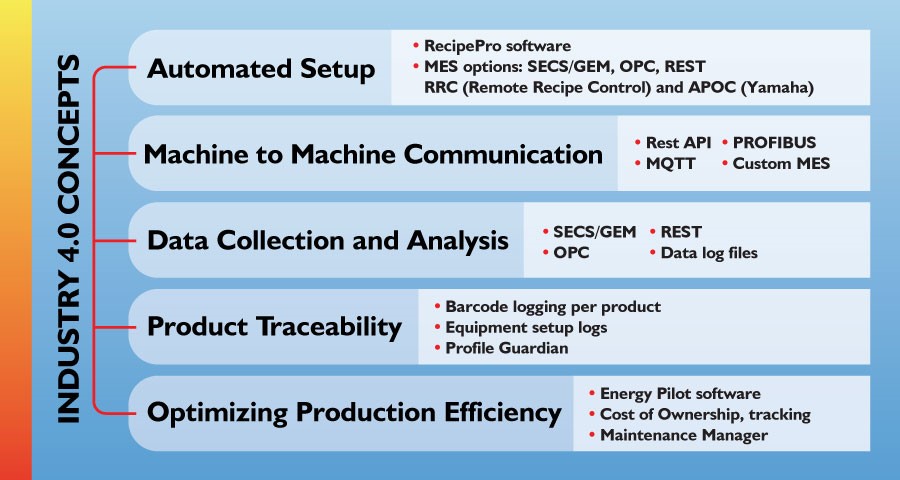
Profile Guardian traceability data is available to external systems via:
- Simple Data Collection to file — JSON or CSV dropped to a shared folder
- SECS/GEM — semiconductor industry standard for machine-to-host communication
- OPC — OLE for Process Control, for industrial automation integration
- REST/MQTT — REST API and MQTT message broker for modern factory IoT and MES platforms
The broader Wincon platform also supports CFX (IPC Connected Factory Exchange) and Hermes (PCB assembly line standard) for line-level connectivity. Header information — machine name, machine ID, host name, line ID, line name, and datetime format — is shared across all equipment logs and REST/MQTT message broker communications, ensuring consistent identification across your data stack.
Traceability Capabilities at a Glance
| Capability | What it means |
|---|---|
| Board-level product log | One record per board, triggered by barcode scan. Filename includes timestamp + board ID. JSON or CSV. |
| Zone-by-zone temperature data | Captured at the moment the board's midpoint passes each zone's midpoint. Setpoints and actuals logged. |
| Profile Guardian baseline | Statistical baseline (Min, Max, Q1, Q3, Median) established per recipe. Deviation tracked continuously. |
| Pass / Fail per board | Configurable process result — choose which alarm categories affect the result. Fail records include error detail and alarm category. |
| Recipe audit trail | Recipe Logging captures every change: setpoint edits, Profile Guardian baseline updates, operator, timestamp. |
| Process Setup Log | Captures oven configuration on every recipe run and state transition, including PG alarm band settings. |
| Operational Data Log | Daily log: power, N2/air consumption, Busy/Idle/Blocked time, product count. |
| MES integration | SECS/GEM, OPC, REST/MQTT, Simple Data Collection to file. Header data shared across all logs and message broker. |
| Barcode scanner support | Handheld and fixed-position. 1D and 2D formats (Code 39, Code 93, Code 128, Data Matrix). RS232 to Wincon. |
| Runs continuously | 24 hours a day, 365 days a year. Oven-state-aware — distinguishes recipe changeovers from true deviations. |
See how BTU's board-level traceability works in practice.
We'll walk you through how barcode-triggered logging, Profile Guardian monitoring, and MES integration work together — so you can see exactly what your process records will look like before you need them.